
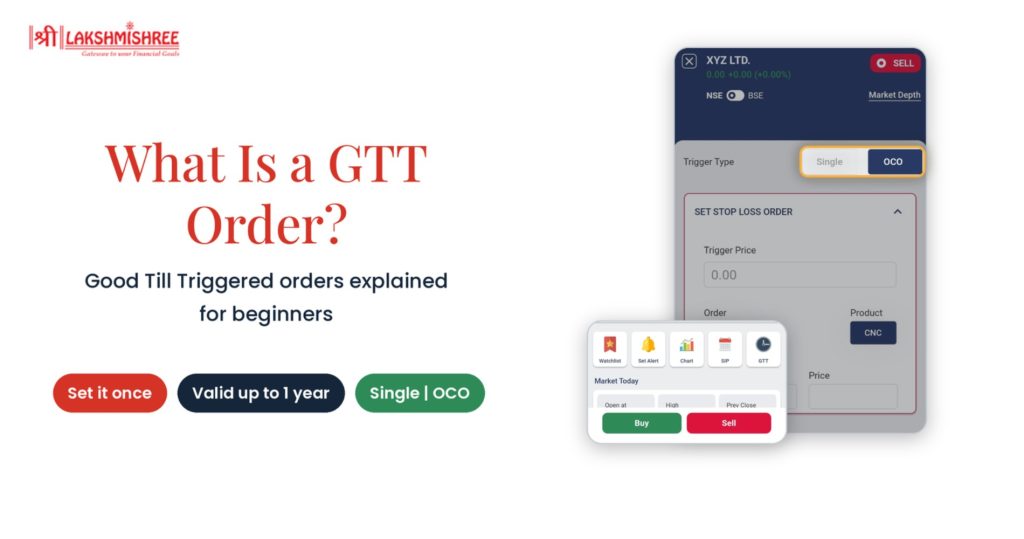
You like a stock, but the price feels too high today. You keep checking the app for a dip and still miss it. Sound familiar? That is where a GTT order helps. So, what is GTT order? It is a standing instruction that places your trade automatically when your chosen price is reached.
The same problem hits sellers. A holding moves into profit, you get busy, and the price turns before you book it.
Waiting for the right price should not mean staring at your screen all day. You set your price once and carry on with your day. Your broker watches the market for you.
In this guide, you will learn the meaning, types, benefits, limits and the exact steps to place one.
GTT stands for Good Till Triggered. The GTT order meaning is simple. It is an order that stays alive until your trigger price is touched or until it expires.
Think of it as a price alert that also places the order for you. A normal alert only pings your phone. A Good Till Triggered order takes action.
Here is why this matters in the share market. A regular order is valid for one trading day. If your price is not reached, it expires. You then have to place it again the next day, and the day after.
A good till triggered order removes this repeat work. You place it once. Once the trigger price is hit, the order is sent to the exchange as a live order.
It suits investors who plan their trades around price levels instead of daily market moves.
This follows a simple flow:
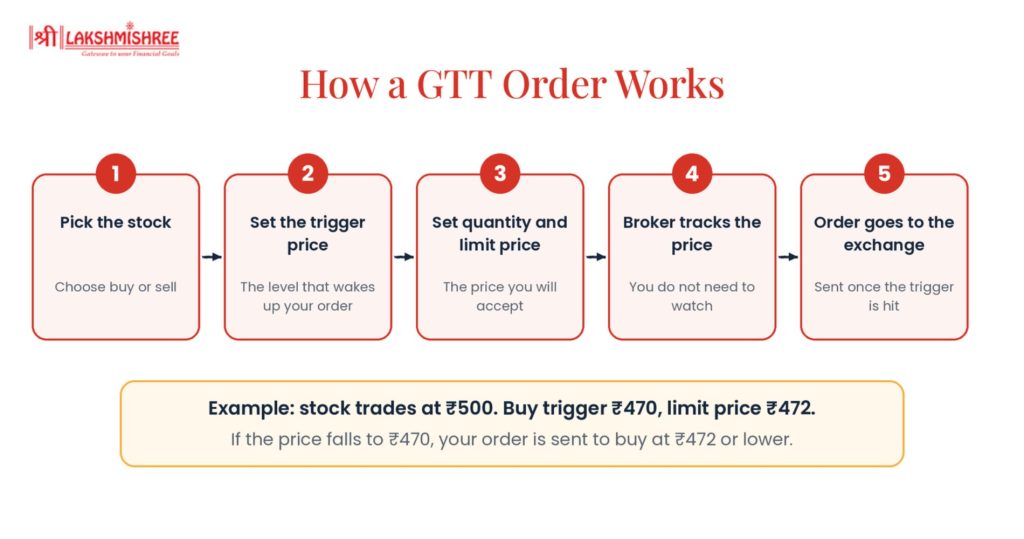
The trigger price is the level that wakes up your order. Until the stock reaches it, nothing happens.
The limit price is the price at which your order is placed once it wakes up. It sets the worst price you are willing to accept.
Say a stock trades at ₹500. You want to buy only if it drops. So you create a buy GTT with a trigger price of ₹470 and a limit price of ₹472.
If the stock falls to ₹470, your order goes to the exchange such as NSE or BSE. It tries to buy at ₹472 or lower. If the stock never falls that far, nothing happens.
GTT order validity is 1 year. If the trigger price is not reached in that time, the order expires on its own.
Two more points to remember:
These are of three types. Each one suits a different goal.
A single trigger has just one price condition. It is the simplest option.
Use it to enter a new position or to exit an existing one. For example, you can buy a stock only if it falls to a set level. Or you can sell a holding only when it rises to your target price.
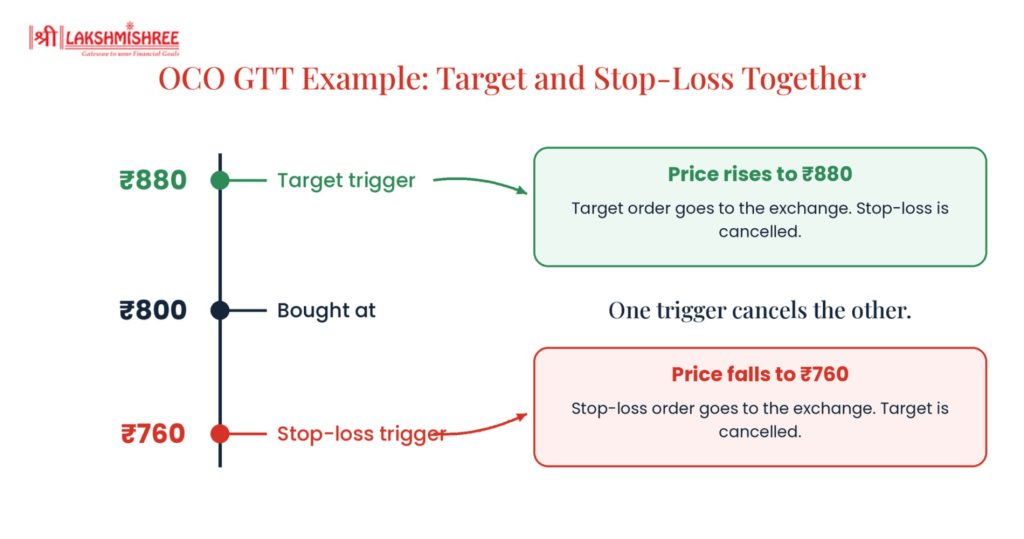
An OCO order combines two triggers in one order. One is your stop-loss. The other is your target price.
When one trigger is hit, the other is cancelled automatically.
Here is an example. You bought a stock at ₹800. You set a target trigger at ₹880 and a stop-loss trigger at ₹760.
On Shree Varahi, OCO is available for sell orders only.

A normal stop-loss stays at one fixed price. A trailing stop-loss moves up as the stock price rises. It keeps a set gap below the market price.
Here is an example. A stock trades at ₹1,000 and you set a gap of ₹50. Your stop-loss sits at ₹950.
This helps you lock in gains while still giving a stock room to grow.
| Feature | Single Trigger | OCO | Trailing Stop-Loss |
| Number of triggers | One | Two (stop-loss and target) | One that moves with the price |
| Best for | Entering or exiting a position | Setting profit and loss exits together | Protecting gains as the price rises |
| Trigger level moves | No | No | Yes, upward only |
| Feature | Regular (Day) Order | GTT Order |
| Validity | One trading day | Up to 1 year |
| Need to track the price | Yes | No |
| Where the order waits | On the exchange | With your broker until triggered |
| Repeat entry needed | Yes, every day | No |
| Best for | Quick, same-day decisions | Planned buys and exits at set prices |
A GTT order is not a replacement for regular orders. It is an extra tool for situations where patience pays off.
Related Reading: Stock Market Order Types: Meaning, Different Types, Examples & How to Use Them | What is Limit Order? Meaning, Types, Example & How It Works
To reduce risk, set sensible prices and review your pending orders now and then.
Learning how to place this order type takes less than a minute on the app. Follow these steps.
Step 1: Open the stock page. Search for the stock and open it. Below the market depth, tap the GTT icon.
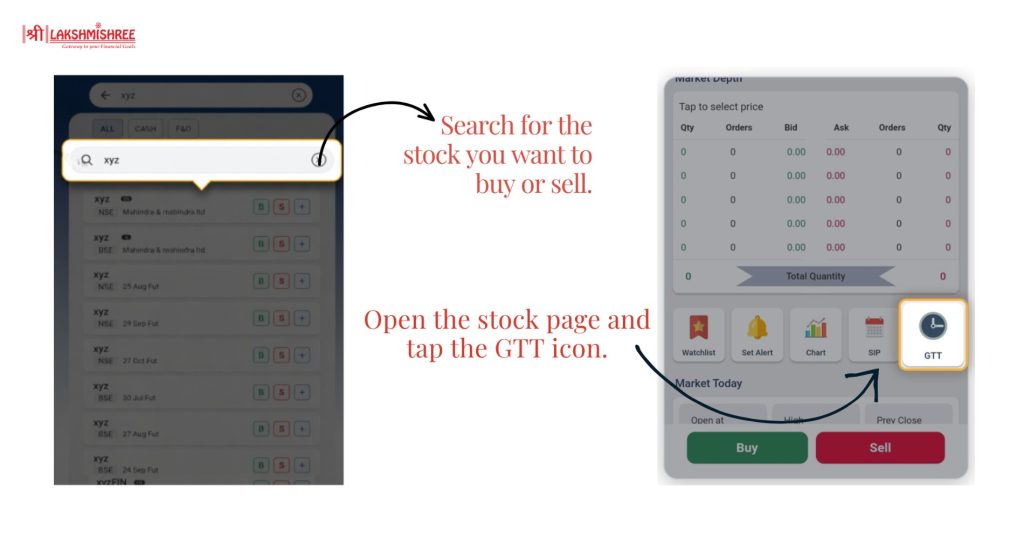
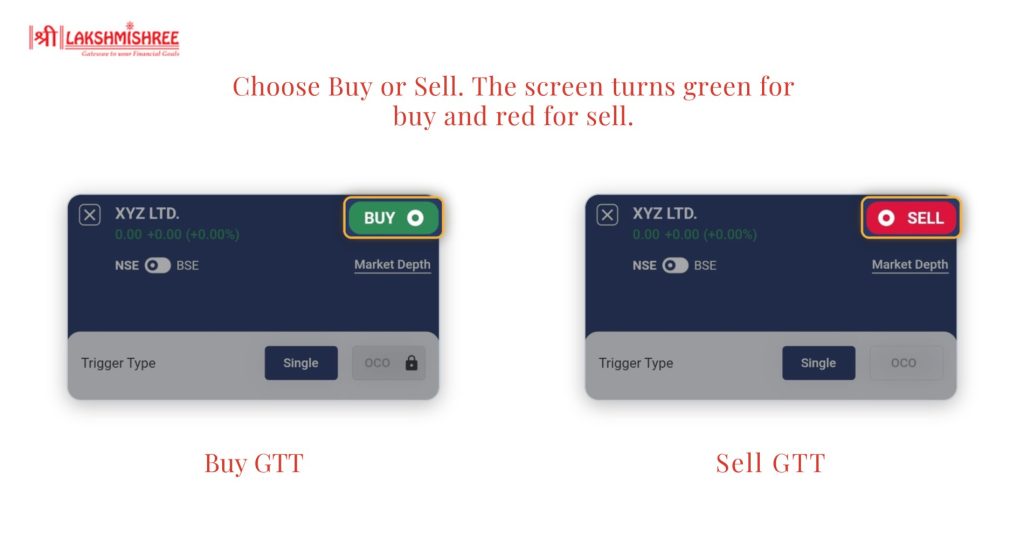
Step 2: Choose buy or sell. Pick your side at the top right. The screen turns green for buy and red for sell. Use the toggle to select NSE or BSE.
Step 3: Select the trigger type. Choose Single for one trigger price. Choose OCO for a stop-loss and a target together. OCO is available for sell orders only.
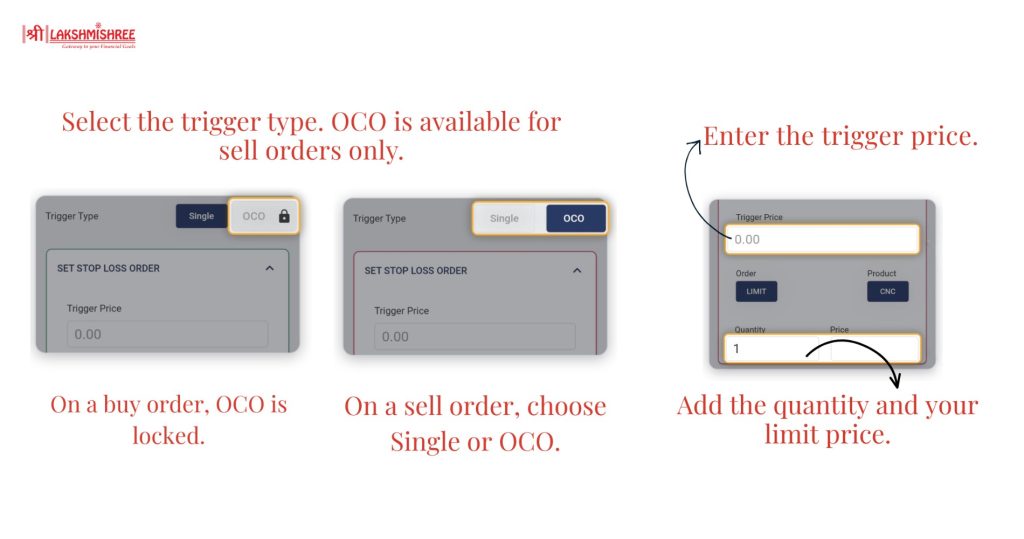
Step 4: Enter your order details.
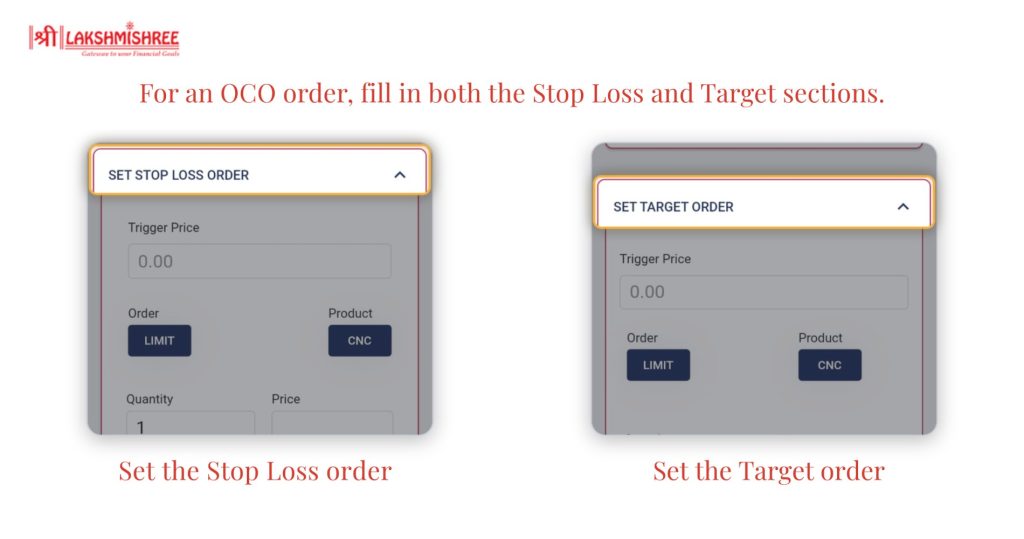
For an OCO order, fill in both the Stop Loss Order and the Target Order sections.
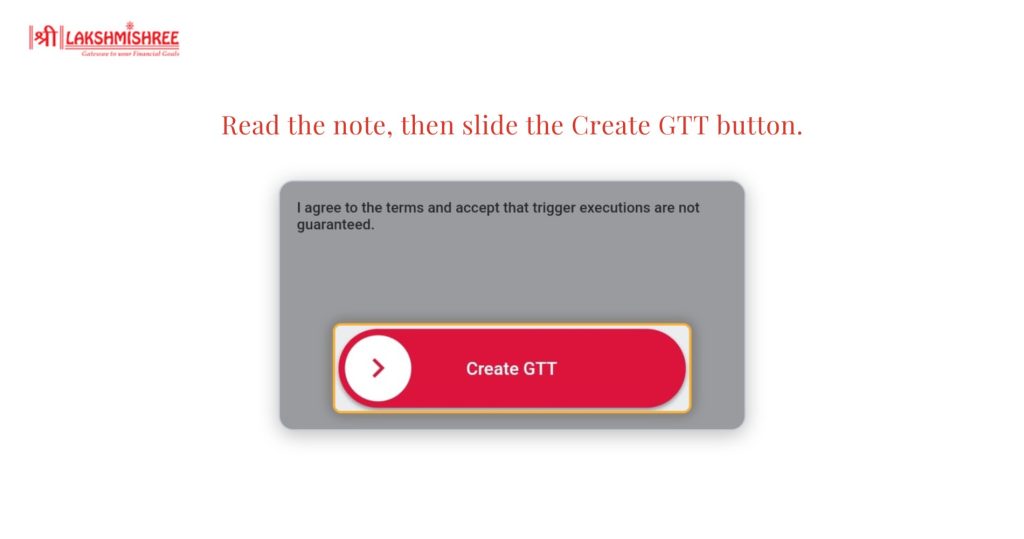
Step 5: Confirm and create. Read the note that trigger executions are not guaranteed. Then slide the Create GTT button to place your order.
Tip: For a buy order, keep your limit price slightly above the trigger price. For a sell order, keep it slightly below. This gives your order a better chance of filling.
You need an active demat account and trading account to use this order type.
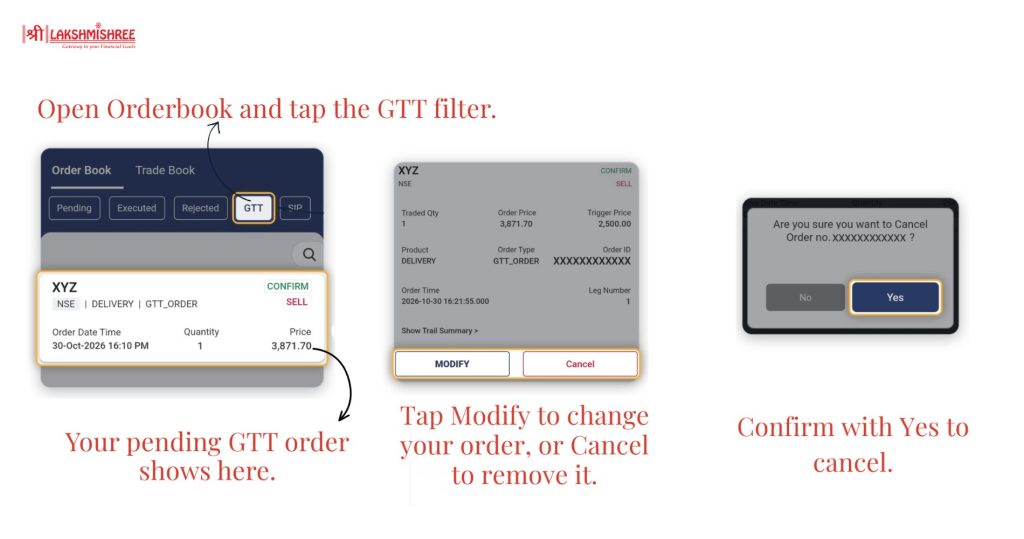
So, what is GTT order in simple words? It is a plan you set once and let your broker follow. You pick the price, and the order goes to the exchange only when that price is reached.
It saves time and supports disciplined investing. Whether you use a single trigger, an OCO order or a trailing stop-loss, the idea is the same: decide first, act automatically.
Like every order type, it has limitations too. It is not guaranteed to execute, it expires after 1 year, and it works for delivery orders only. Start with a small quantity, review your pending orders regularly, and let your plan do the work.
It is an instruction to buy or sell a stock when it reaches a price you choose. You set it once, and it is placed automatically when the trigger price is hit.
This order type is valid for 1 year. If the trigger price is not reached in that time, the order expires, and you can place a new one.
The types are Single trigger, OCO (One Cancels the Other) and trailing stop-loss. OCO is available for sell orders only.
No. These orders use the CNC (delivery) product type, so they are meant for delivery trades and not for intraday trading.
No. Once triggered, the order fills only if the market offers your price. Trigger executions are not guaranteed.
Disclaimer: This article is intended for educational purposes only. Please note that the data related to the mentioned companies may change over time. The securities referenced are provided as examples and should not be considered as recommendations.